
Du Integration Guide (Infomedia-Hosted)
Self-Generated Flow
This page describes the steps required to acquire Du customers via the Evina flow, using Self-Generated security scripts.
The sequence diagram below shows a detailed breakdown of the complete flow. Each step is explained in more detail in the following sections.
Flow Diagram
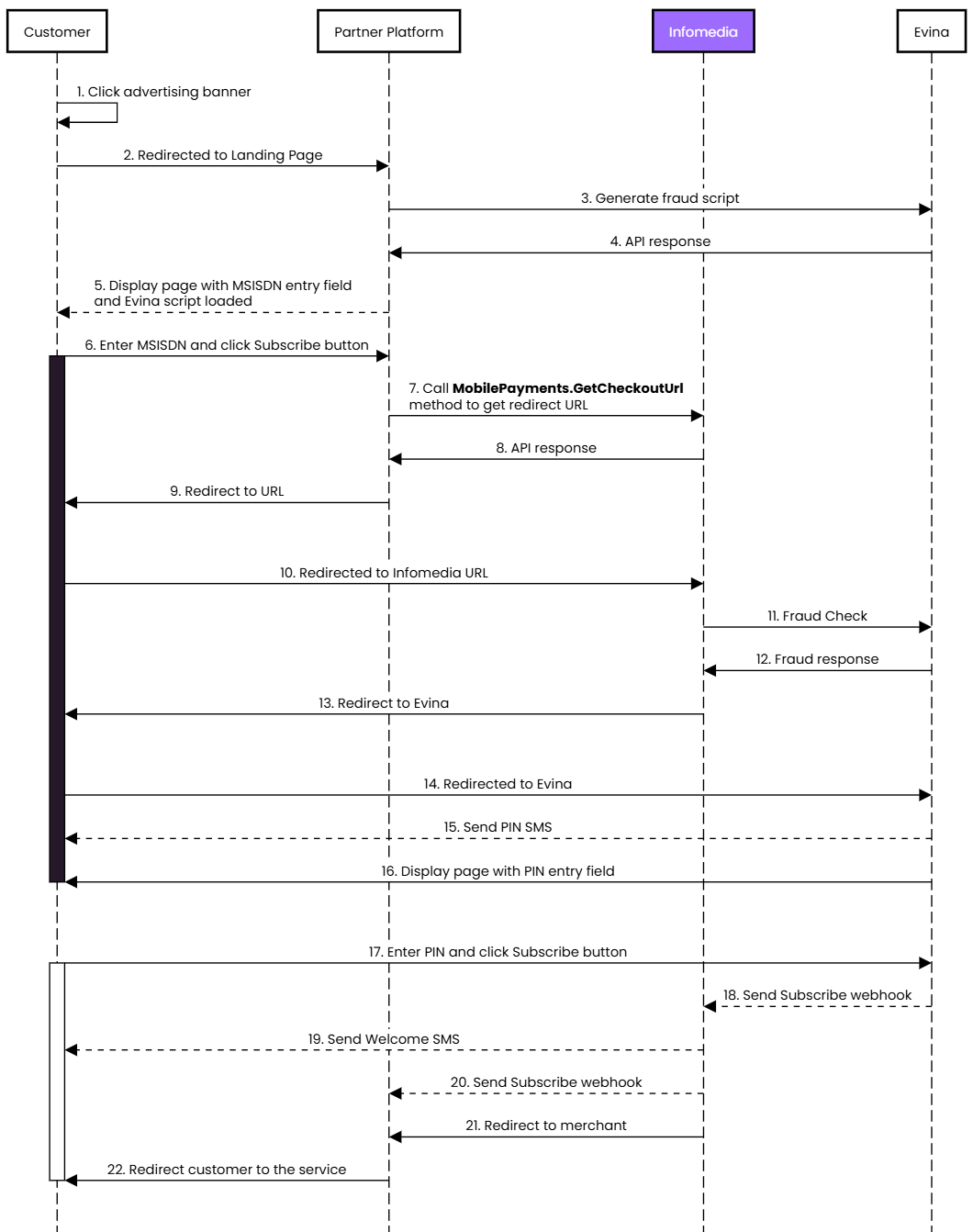
Flow Description
Evina Security Script
You will need to integrate Evina's script API and embed the returned script on the page. When calling Evina you will need to set the pl parameter to infomedia_du_uae. The pl parameter is an array so should be provided in the following format:
pl=["infomedia_du_uae"]
The generated script should be included in a <script> tag inline within the <head> of the document. Refer to the Evina documentation↗ for best practice on implementing the script and how to verify that it is loaded correctly.
MSISDN Entry Page
Please check the Compliance Guide↗ for the relevant design rules for this integration.
On this page the user will enter their MSISDN and click a button to request a PIN. You will need to call the GetCheckoutUrl API, passing the relevant details. Infomedia will generate a tokenised URL for you to redirect the customer to.
The example below shows the minimum fields required for generating a redirect URL. If you're experiencing errors, first validate that all required headers and parameters are present and in the correct format. Please refer to the documentation page for more detailed information about each parameter.
Example GetCheckoutUrl Request
POST https://api.infomedia.co.uk/dcb/GetCheckoutUrlContent-Type: application/jsonX-Infomedia-Api-Key: {Your API Key}{"params": [{"key": "pid","value": "92000000"},{"key": "subid","value": "8000000"},{"key": "mx","value": "971500000000"},{"key": "mcc","value": "424"},{
"key": "mnc",
"value": "03"},{
"key": "pt",
"value": "Your reference for this subscriber"
},{
"key": "surl",
"value": "https://example.com/?status=success"
},{
"key": "eurl",
"value": "https://example.com/?status=error"
},{
"key": "securityprocessidext",
"value": "The ti parameter used to generate Evina's security script"
},{
"key": "description",
"value": "SERVICE DESCRIPTION"
}],
"u": "USERNAME",
"p": "PASSWORD"}
Example GetCheckoutUrl Response
{"status": "Success","description": "00 - Everything was OK","url": "https://example.com/"}
Redirect Response
Depending on the outcome of the flow the user will be redirected to one of the URLs provided in the GetCheckoutUrl request.
surl - The subscription was successful and the user should be given access to the service
eurl - An error occurred during the flow. This can be for any number of reasons.
Common Issues
The user is immediately returned to the surl
This occurs if the user still has an active subscription. If this occurs during testing, please cancel the subscription and try again.
The user is immediately returned to the eurl
This occurs if a fraud check fails. If the service is not yet live it's possible that the script has not been properly implemented. Check the Evina documentation to see tips on how to verify the script is running. If the script is running properly, there could be a configuration issue. Please contact the Operations team.
The Evina page is shown briefly before being return to the eurl
This should only occur whilst integrating the product. It's likely there is a configuration issue. Please contact the Operations team.